| Author |
Message |
Mathieu Fiset
Joined: Sep 23, 2010
Posts: 2
Location: Quebec, Canada
|
 Posted: Thu Sep 23, 2010 6:10 pm Post subject:
Using Expression Pedal with Nord Lead 2x Posted: Thu Sep 23, 2010 6:10 pm Post subject:
Using Expression Pedal with Nord Lead 2x
Subject description: As volume control ? |
  |
|
Hi !
This sounds like a stupid question but well...how can I use an expression pedal (Roland EV-5) on the Nord Lead 2x as a volume/gain control pedal ? Is that even possible ?
As I understand in the manual, an expression pedal can only be used to control what the mod wheel already control...
Will I need an "audio" volume pedal just like a guitar player ?
Let me know, thanks !
Mathieu |
|
|
Back to top
|
|
 |
Wout Blommers

Joined: Sep 07, 2003
Posts: 4529
Location: The Hague - The Netherlands
Audio files: 123
G2 patch files: 12
|
| Posted: Fri Sep 24, 2010 1:48 am Post subject:
|
|
|
 Mathieu Fiset Mathieu Fiset
What I once did is using the Midi Out function of the Lead.
You'll need a kind of Midi Mapper, though, but Jan Punter (BlueHell) created MidiMod a long time ago.
See http://www.iaf.nl/Users/BlueHell/html/software/software-midimod.htm
It's PC only.
You'll need a computer and a Midi cable running from Midi In Out to Midi In.
It is a live performance set up, not a studio/sequencer set up...
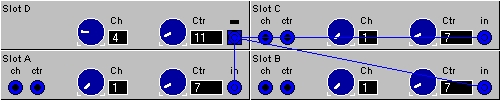
In this example the Pedal sends Midi CC #11 signal on Midi channel 4, which is converted to Midi CC #07 on Midi channel 1.
Slot D is NOT activated, so there is no effects what-so-ever on this Slot in the sound.
The Pedal can be configurated in each Slot individually. Slot D asign it to [off], so it copies the Wheel set to Morph but no Morphing at all is created there...
The Wheel is assign able to every effect in Slot A, B and C.
Beware the Midi channels are set to 1
The Pedal controls Midi CC #07, which is the Gain of each Slot.
Also beware the Roland Pedal has a certain range, so mostly one can't reach completely silence or max gain... There are also Pedal settings in the Special Menu, see [Manual 2X page 20 point 7] and thry to find the right setting together with the fine tuner on the Roland EV.
Also maybe it's better to set Glabal Midi to channel 16
Wout
| Description: |
|
| Filesize: |
43.23 KB |
| Viewed: |
17142 Time(s) |
|
|
|
|
Back to top
|
|
|
Mathieu Fiset
Joined: Sep 23, 2010
Posts: 2
Location: Quebec, Canada
|
| Posted: Fri Sep 24, 2010 5:53 am Post subject:
|
|
|
Hey thanks a lot !
Seems more complicated than I though for a simple volume control haha  |
|
|
Back to top
|
|
|
Wout Blommers
Joined: Sep 07, 2003
Posts: 4529
Location: The Hague - The Netherlands
Audio files: 123
G2 patch files: 12
|
| Posted: Fri Sep 24, 2010 6:56 am Post subject:
|
|
|
| Mathieu Fiset wrote: | Hey thanks a lot !
Seems more complicated than I though for a simple volume control haha |
Sure, but this way you can keep the Wheel functional.
The simple way is [Shift+Special > E.off] and assign the Morph to the Gain (0-127). This works, but the Wheel is gone...
Wout |
|
|
Back to top
|
|
|
rodv
Joined: Nov 03, 2010
Posts: 9
Location: Guatemala
|
|
|
Back to top
|
|
|
Wout Blommers
Joined: Sep 07, 2003
Posts: 4529
Location: The Hague - The Netherlands
Audio files: 123
G2 patch files: 12
|
|
|
Back to top
|
|
|
rodv
Joined: Nov 03, 2010
Posts: 9
Location: Guatemala
|
| Posted: Wed Apr 20, 2011 7:14 am Post subject:
|
|
|
| ohhh thanks man, i'll take a look.. it should feel incredible to manage those filters and morph with this pedal. |
|
|
Back to top
|
|
|
Wout Blommers
Joined: Sep 07, 2003
Posts: 4529
Location: The Hague - The Netherlands
Audio files: 123
G2 patch files: 12
|
| Posted: Wed Apr 20, 2011 8:11 am Post subject:
|
|
|
| rodv wrote: | | ... it should feel incredible to manage those filters and morph with this pedal. |
The use of the pedal is limited. Read the Manual first!
Wout |
|
|
Back to top
|
|
|
rodv
Joined: Nov 03, 2010
Posts: 9
Location: Guatemala
|
| Posted: Fri Apr 22, 2011 6:04 pm Post subject:
|
|
|
well man i have read the manual, and i don't pretend to be an expert on this matter but according to the user manual it says:
The connected pedal will either duplicate the MODULATION WHEEL functionality or independently control one of a number of parameters. You can select different Control Pedal functions for each of the four Slots.
Display shows: Pedal assigned to:
LFO 1 Amount.
LFO 2 Amount.
Filter Cutoff Frequency.
FM Amount.
Oscillator 2 Pitch.
So according to that info yes, it's possible to use the pedal to modify the lfo rate, but my question was if this moog pedal worked with the unit, but it seems like it does, thanks. |
|
|
Back to top
|
|
|
Wout Blommers
Joined: Sep 07, 2003
Posts: 4529
Location: The Hague - The Netherlands
Audio files: 123
G2 patch files: 12
|
| Posted: Fri Apr 22, 2011 10:24 pm Post subject:
|
|
|
Yes, I know
As you see the functionality misses the Gain. When using the organ sounds musicians want to control the volume (Gain) and the amount of 'Lesley effect' (Wheel). To get the the volume the wheel has to assigned to the Morph only controlling the Gain. So using both is impossible...
Just in case you'll need this.
Wout |
|
|
Back to top
|
|
|
|


 Forum index » Instruments and Equipment » Nord Lead and Nord Wave synths

 FAQ
FAQ Calendar
 Search
 Memberlist
 Usergroups
 Register
 Profile
 Log in to check your private messages
 Log in
 Chat Room


